First layer not sticking? What your printer does for you, and what's still up to you
When a print comes loose halfway, it almost always started wrong at the first layer. What a modern 3D printer does on its own (mesh leveling, heated bed, closed chamber) and what's still up to you: clean plate, nozzle distance, a slower first layer.
In summary
- When a print comes loose halfway through, it almost always started wrong at the first layer.
- A modern printer measures the plate and heats it on its own; a clean plate, the nozzle distance and a slower first layer are still up to you.
- PLA and PETG don't need a closed chamber; for ABS, ASA and nylon PA6 the line to check on the spec sheet is the closed chamber.
Why the first layer decides the print
The first layer is the base everything else stands on. If it doesn't bond to the plate, the print can come loose halfway through, or the corners lift as the layers above cool down. A good first layer is smooth and even: lines that touch without gaps and without ridges, the same across the whole plate (Bambu Lab Wiki).
What the printer does on its own
Three lines of the MakerSpecs spec sheet tell you how much of the job the machine takes on.
Automatic bed leveling (mesh, single point, or none). With mesh leveling the printer probes the plate at a grid of points spread across its surface and builds a virtual map of it (Prusa Knowledge Base); while printing it raises and lowers the nozzle to follow the plate's unevenness. With single-point leveling it only measures the height in one place. With none, leveling is done by hand: a sheet of paper between nozzle and plate, adjusting each corner's screw until the nozzle just touches the paper (Bambu Lab Wiki, A1).
Heated bed (maximum bed temperature). The maximum declared temperature decides which materials you can print: PLA wants 50 °C (122 °F), PETG 70 °C (158 °F), ABS and ASA 100 °C (212 °F). A bed that stops at 80 °C (176 °F) covers PLA and PETG, not ABS. The full list is in the table below.
Closed chamber. Materials that shrink a lot as they cool need it: in our catalog ABS, ASA and nylon PA6. The plastic far from the plate cools, shrinks and pulls the corners up; the Prusa Knowledge Base puts it down to the sudden temperature difference between the nozzle and the surrounding air (Warping). PLA doesn't need it, and Prusa itself notes that printing PLA or PETG in an enclosure might not be a good idea.
What's still up to you
- A clean plate. The grease from your fingers is enough to spoil adhesion. Handle the plate by its edges, and every so often wash it with warm water and a little dish soap: Bambu Lab recommends water and detergent and not touching the surface (Bambu Lab Wiki), Prusa recommends isopropyl alcohol for routine cleaning and soap and water when that's no longer enough (Prusa Knowledge Base). Check your plate's instructions: some surfaces have their own rules.
- The right bed temperature for the material. The slicer usually proposes it once you choose the filament and the plate type; in Bambu Studio, choosing the wrong plate type means printing with the bed too cold. PETG wants the bed about 20 °C (36 °F) hotter than PLA.
- The nozzle distance (Z-offset, "how much it squishes"). It's the adjustment that depends on your plate and your filament. Prusa calls it Live Adjust Z: you fine-tune it while the first layer is printing.
- A slower first layer. Prusa suggests about 75 % of normal speed for the first three layers; Bambu Lab gives 30 mm/s for outer walls as an example. Slower lines have more time to bond.
- Watching the first layer before walking away. It takes a couple of minutes, and it's when you can still stop the print.
How to recognize it
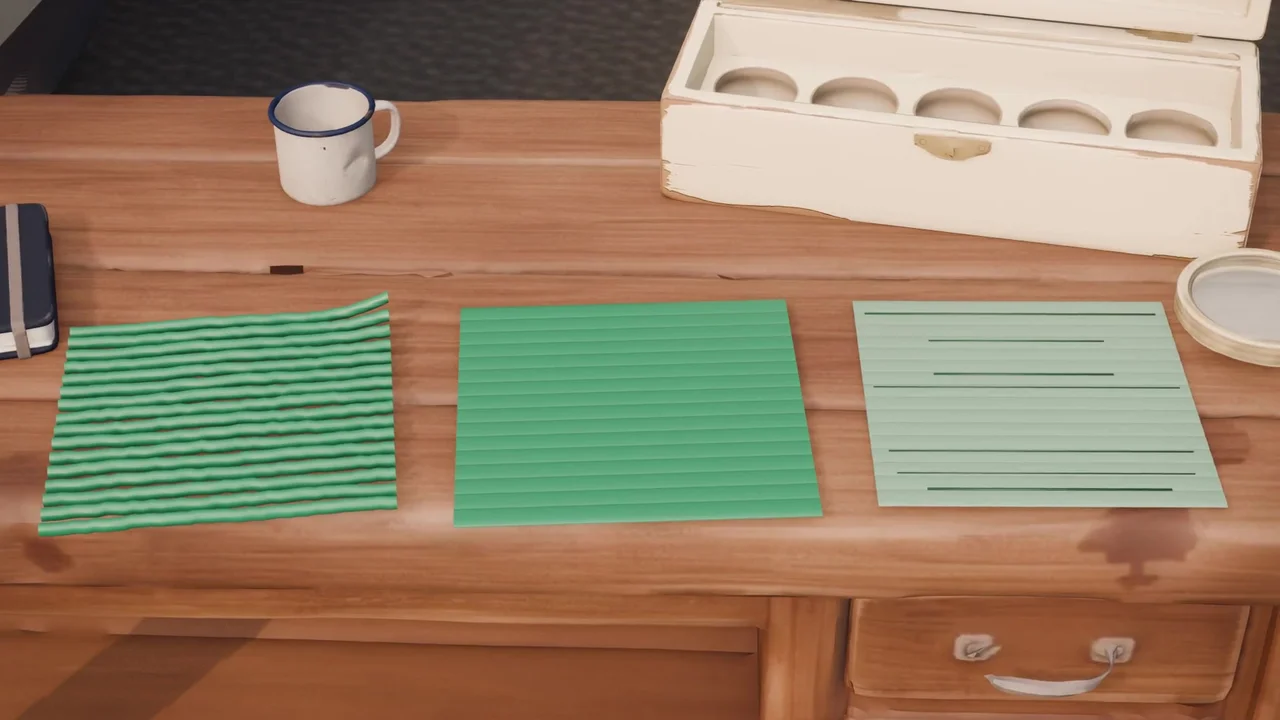
| Nozzle | What you see |
|---|---|
| Too high | Round lines that don't touch each other, like spaghetti; they barely stick and lift at the first corner |
| Just right | Flat lines that touch each other, a smooth, even surface |
| Too low | A thin layer, almost transparent or ridged; the nozzle drags and scratches the plate |
How to fix it: in the printer's menu, adjust the nozzle distance (Z-offset, Live Adjust Z) one small step at a time and print the first layer again. Prusa warns against making up for poor adhesion by lowering the nozzle: if the plate is dirty or the temperature is wrong, the distance isn't the cause.
When it comes loose
| Symptom | Likely cause | What to do |
|---|---|---|
| The first layer doesn't stick anywhere | Dirty plate, or wrong plate type or bed temperature | Wash the plate; check material and plate type in the slicer |
| It sticks in some areas and not in others | Grease in some spots, or leveling that no longer matches the plate | Clean the plate; run the bed leveling calibration again |
| The corners lift during the print | The material shrinks as it cools (ABS, ASA, nylon) | Closed chamber; brim in the slicer |
| The print comes loose halfway | The first layer started wrong | Go back to the first layer: clean plate, distance, speed |
| The nozzle scratches the plate | Nozzle too low | Raise the Z-offset by one step |
Materials: bed temperature and closed chamber
| Material | Bed | Closed chamber |
|---|---|---|
| PLA | 50 °C (122 °F) | not needed |
| PETG | 70 °C (158 °F) | not needed |
| TPU | 45 °C (113 °F) | not needed |
| ABS | 100 °C (212 °F) | needed |
| ASA | 100 °C (212 °F) | needed |
| Nylon PA6 | 90 °C (194 °F) | needed |
| Nylon PA12 | 70 °C (158 °F) | not needed |
Values from the MakerSpecs materials catalog. To choose between the two most common filaments, see PLA vs PETG.
In the catalog
Of the 107 FDM printers in the MakerSpecs catalog, 93 declare mesh bed leveling, almost nine in ten, and none stops at a single point (the other 14 don't declare it). 86 heat the bed to 100 °C (212 °F) or more: eight in ten. The line that splits the catalog in half is the closed chamber: 46 have one, 48 don't, 13 don't declare it. One example: the Bambu Lab A1 has mesh leveling and a bed up to 100 °C (212 °F), with no closed chamber. All the machines: FDM 3D printers. Maximum values as declared by the manufacturers, figures as of October 22, 2026.
Who should do what
- Printer with mesh leveling: let it do its job, and keep the bed leveling calibration on at the start of each print, as Bambu Lab recommends. Your part is the clean plate, the distance and the speed.
- Older or second-hand printer without a mesh: the sheet of paper, corner by corner, then a second round, because each screw affects the others.
- If you're buying to print PLA or PETG: mesh leveling and a heated bed are now standard (93 and 86 printers out of 107), not an extra to pay for, and you don't need a closed chamber.
- If you'll print ABS, ASA or nylon: the line to check on the spec sheet is the closed chamber.
Watch Captain Benchy explain it in the video of October 22.
Sources
- Prusa Knowledge Base: First layer issues, Live adjust Z, Mesh bed leveling, Warping
- Bambu Lab Wiki: First layer not sticking, Identify and fix first layer issues with a test print, A1 manual bed tramming
- MakerSpecs catalog: materials and FDM printer spec sheets.